Producing an elaborate screenshot of Glamorous Toolkit through a script
We often show screenshots of Glamorous Toolkit in our communication. For example, the article about What exactly is Glamorous Toolkit v1.0? contains multiple screenshots showing various scenarios. Like this one:
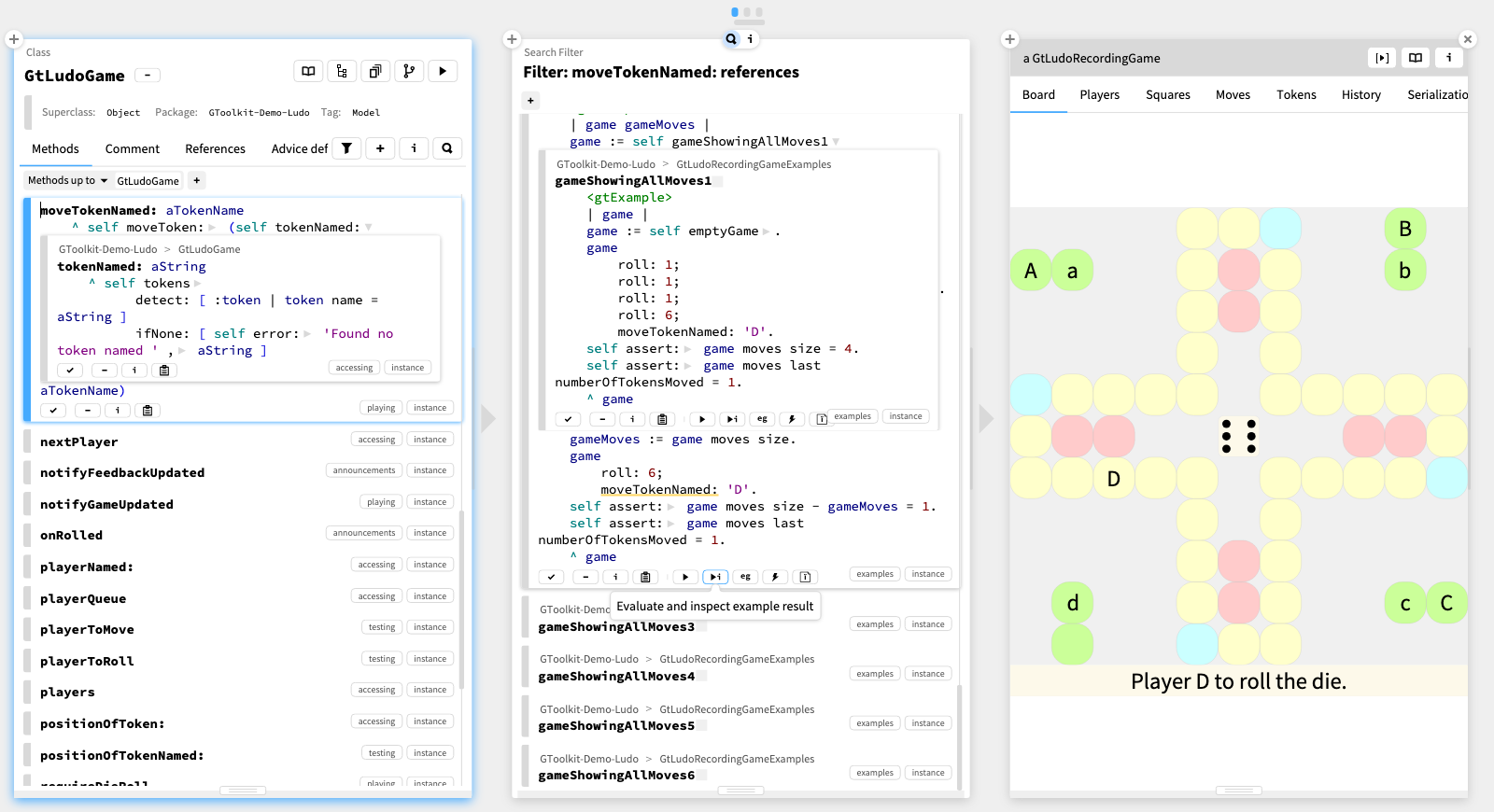
This screenshot contains an elaborate scene with three panes. In the first pane, we have a Coder on the GtLudoGame
class, in which we have expanded GtLudoGame>>#moveTokenNamed:
method and in that method we expanded a message. Then we looked for references by pressing a shortcut and this produced a second pane with a filter tool. In that filter tool we scrolled down to GtLudoRecordingGameExamples>>#gameShowingAllMoves2
, a method that happens to be an example (which is like a test that returns an object). We expanded the method and we executed the example by clicking on the button from the contextual toolbar of the method coder. This then produced the third pane containing an inspector with the result. And a little detail: as the mouse hovered over the button there is also a tooltip associated with that button.
These actions can be produced manually. But a proper graphical stack should allow us to simulate manual interactions programmatically, too. In Glamorous Toolkit we can.
The script below produces the a scene like in the picture from above.
scripter := BlScripter new.
scripter do
	block: [ :aSpace | aSpace extent: 1600 @ 870 ];
	onSpace;
	play.
scripter
	element: (GtPager createWrappedOn: (GtCoder forMethod: GtLudoGame >> #moveTokenNamed:)).
pageWidth := scripter space width / 3.
scripter do
	block: [ :aPage | aPage width: pageWidth ];
	// (GtPagerPageElementId indexed: 1);
	play.
scripter shortcut
	combination: BlKeyCombination primaryN;
	// (GtPagerPageElementId indexed: 1);
	// (GtSourceCoderId indexed: 24);
	// GtSourceCoderEditorId;
	onChildAt: 1;
	onChildAt: 1;
	play.
scripter do
	block: [ :aPage | aPage width: pageWidth ];
	// (GtPagerPageElementId indexed: 2);
	play.
scripter methodCoder
	clickOnMethodCoderExpander: 1 insideDo: [ :aStep1 |  ];
	// (GtPagerPageElementId indexed: 1);
	// (GtSourceCoderId indexed: 24);
	play.
scripter mouseWheel
	downBy: 150;
	// (GtPagerPageElementId indexed: 2);
	// GtPharoStreamingMethodsCoderListId;
	// BrInfiniteListElement;
	play.
scripter mouseWheel
	downBy: 150;
	// (GtPagerPageElementId indexed: 2);
	// GtPharoStreamingMethodsCoderListId;
	// BrInfiniteListElement;
	play.
scripter click
	// (GtPagerPageElementId indexed: 2);
	// (GtSourceCoderId indexed: 25);
	// #sidebar;
	play.
scripter mouseWheel
	downBy: 42;
	// (GtPagerPageElementId indexed: 2);
	// GtPharoStreamingMethodsCoderListId;
	// BrInfiniteListElement;
	play.
scripter methodCoder
	clickOnPlayAndInspectExampleButton;
	// (GtPagerPageElementId indexed: 2);
	// (GtSourceCoderId indexed: 25);
	play.
scripter do
	block: [ :aPage | aPage width: pageWidth ];
	// (GtPagerPageElementId indexed: 3);
	play.
scripter methodCoder
	clickOnMethodCoderExpander: 1 insideDo: [ :aStep1 |  ];
	// (GtPagerPageElementId indexed: 2);
	// (GtSourceCoderId indexed: 25);
	play.
scripter mouseWheel
	downBy: 42;
	// (GtPagerPageElementId indexed: 2);
	// GtPharoStreamingMethodsCoderListId;
	// BrInfiniteListElement;
	play.
scripter mouseMoveOver
	// (GtPagerPageElementId indexed: 2);
	// (GtSourceCoderId indexed: 25);
	// GtMethodCoderPlayAndInspectExampleActionId;
	onTopMost;
	play.
scripter
The script makes use of BlScripter
, a scripting engine for the graphical stack. Scripter offers an an API that provides default abilities for searching for elements and for simulating actions (such as click or shortcut). The API is also extensible with higher level queries, such as methodCoder which gives us more concise abilities to work with a tool like Coder. For example, we can ask quite concisely a methodCoder to clickOnPlayAndInspectExampleButton.
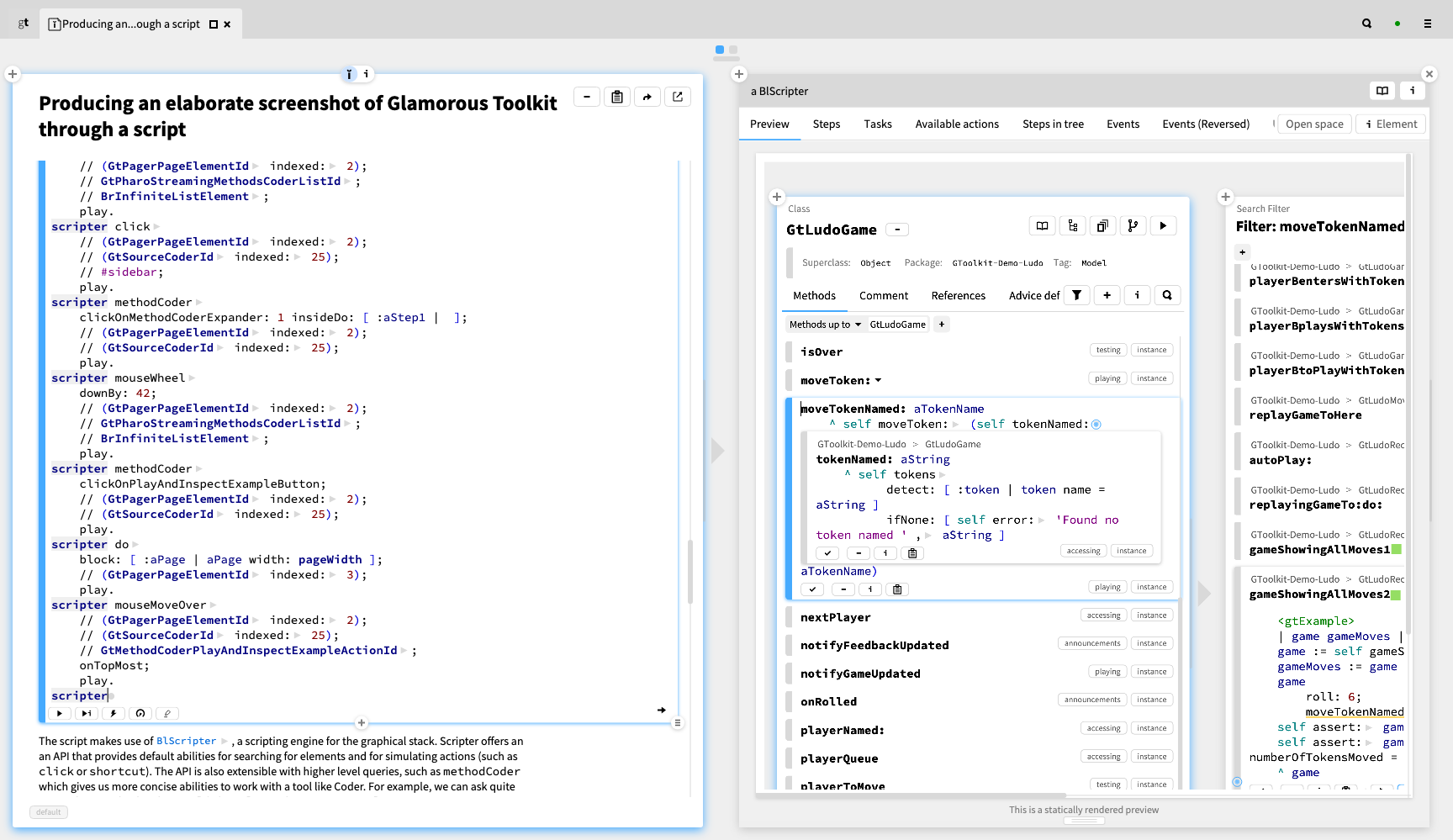
The above script is quite elaborate. But the good news is that you can build it iteratively. Here is how it looks like in the editor that we used to write this very article. Executing the code from the snippet simply shows an inspector on the BlScripter
instance. And this inspector shows multiple dedicated views, one of which is the preview of the resulting scene.
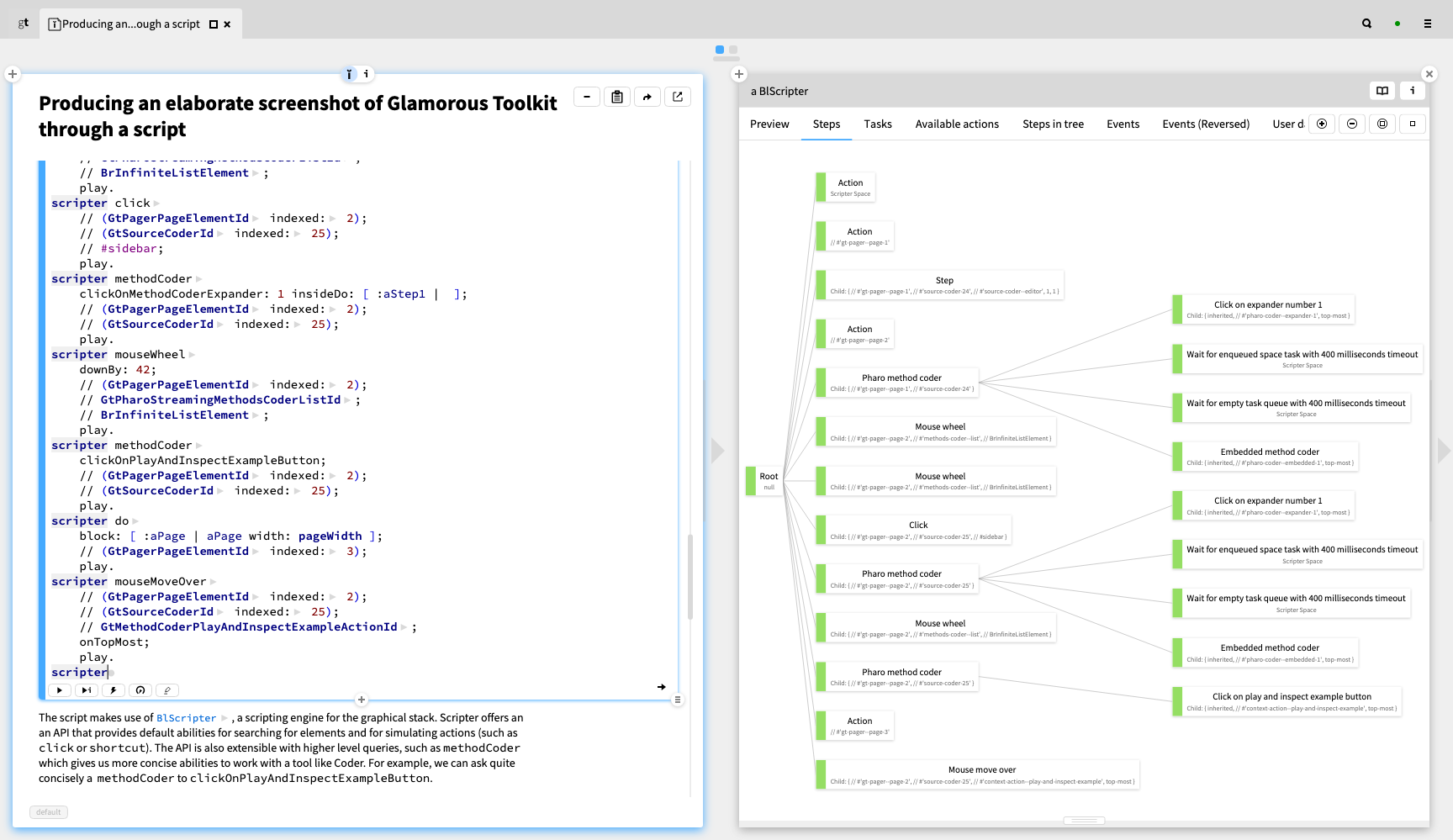
Viewing the result is certainly interesting, but sometimes we are interested in other aspects. For example, a script like ours contains multiple steps and substeps, each of which could potentially fail. The Steps view provides a detailed overview of this structure.
There are a couple of other views and abilities that complement the ones shown here. We invite you to download Glamorous Toolkit to play with it. All in all, Scripter enables us to exercise the entire user interface programatically. This then can be used for various purposes ranging from documentaion to testing.